10 Years of Powertrain Coverage: What Mitsubishi’s Warranty Includes on a 2026 Outlander PHEV
Buying a plug-in hybrid means asking different questions than you would for a gas SUV. The battery, the electric motors,...


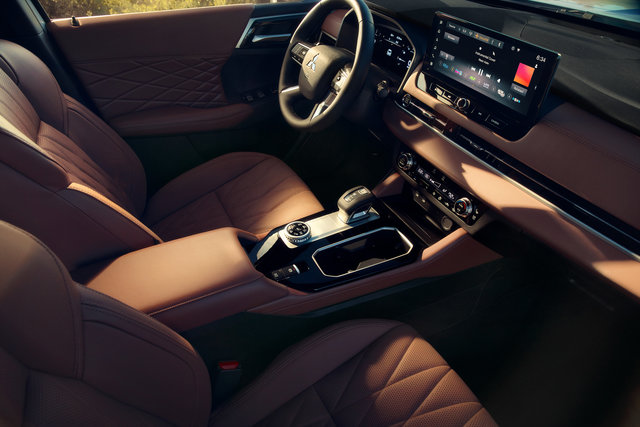
A touchscreen is only useful if it does what you need without a fight. British Columbia’s mix of highway commutes, ferry lineups, and weekend mountain drives puts real demands on a cabin’s tech, not just its spec sheet.
The 2026 Outlander PHEV builds its connected-cabin experience around a few core pieces that work together rather than as separate gadgets bolted onto the dash.
Every 2026 Outlander PHEV trim comes standard with a 12.3-inch Smartphone Link Display Audio touchscreen and a 12.3-inch full digital driver display. The touchscreen is the hub for media, navigation, and vehicle settings.
The driver display sits directly ahead of the wheel and shows speed, navigation prompts, and drive-mode information without forcing a glance sideways at the centre screen. That separation matters more than it sounds: it keeps the driver’s eyes closer to the road while still surfacing the information that changes minute to minute.
Wireless Android Auto and wireless Apple CarPlay are standard across the lineup, so a phone’s maps, music, and messages appear on the touchscreen without a cable. Bluetooth hands-free calling is standard too, covering the basic phone tasks most drivers actually use.
A smartphone wireless charger is standard starting on the SE trim and up, sitting in the centre console so a phone stays topped up without a cord in the way.
Embedded navigation is standard from the LE trim upward. It lives inside the same touchscreen used for media and settings, so route guidance, points of interest, and map views share one interface instead of running as a separate stand-alone unit.
The Multi View Camera System, standard from LE and up, adds exterior camera views to that same display for reversing and tight-lot manoeuvring.
A commute doesn’t leave much time to hunt through menus. Because the driver display keeps speed and navigation cues in the driver’s direct line of sight, a quick glance covers what’s needed for stop-and-go traffic or a highway merge.
For a weekend trip into unfamiliar territory, embedded navigation removes the dependence on a phone mount or cell signal for basic route guidance. For multi-stop errands around town, the same screen that just showed a map switches to the reverse camera view the moment the vehicle is in reverse, without swapping devices or apps.

Mitsubishi Connect, standard from LE and up with a trial included, extends the cabin tech to a phone app. From outside the vehicle, an owner can start the Outlander PHEV to pre-heat or pre-cool the cabin, defrost the windshield, activate the heated seats and heated steering wheel, lock or unlock the doors, and locate the vehicle in a lot.
The app also reports vehicle condition, fuel information, and warnings, so a dash light doesn’t have to wait until the next time someone is behind the wheel to get noticed.
Mitsubishi Connect Safeguard Services adds a safety layer to that same connection: it links to Mitsubishi’s call centre automatically in a collision, through an SOS button, or to arrange roadside assistance. It turns the connected-services idea from a convenience feature into something with a real safety role.
Not every trim carries the same technology, even though the touchscreen and driver display are shared across the lineup. The gap shows up in navigation, camera systems, app connectivity, and audio hardware.
|
Feature |
ES / SE |
LE / SEL |
|
Embedded navigation |
Not included |
Standard |
|
Multi View Camera System |
Rearview camera only |
Standard |
|
Mitsubishi Connect |
Not included |
Standard |
|
Audio system |
Yamaha Premium, 8 speakers |
Yamaha Premium, 8 speakers |
The entry ES and SE trims cover the basics well: the 12.3-inch touchscreen, wireless CarPlay and Android Auto, Bluetooth calling, and an 8-speaker Yamaha Premium system. What they skip is embedded navigation, the Multi View Camera System, and Mitsubishi Connect, relying on a rearview camera instead of the multi-view setup.
Stepping to LE adds all three of those at once: onboard mapping, the multi-view camera system, and the Mitsubishi Connect app. The audio hardware stays at 8 speakers through SEL. The jump to GT and above swaps in the Yamaha Ultimate 12-speaker system and adds a 10.8-inch head-up display, which projects speed and navigation cues onto the windshield itself.
For a shopper who mainly wants navigation, the camera system, and remote app access without paying for the higher-end audio, LE and SEL cover that ground. For someone who wants the strongest in-cabin sound alongside those same features, GT and up are where that shows up.
The Outlander PHEV’s connected-cabin tech is built around one touchscreen and one driver display shared across the lineup, with navigation, camera coverage, app access, and audio hardware separating the trims from there.
Visit Victoria Mitsubishi in Victoria to sit in the different trims and compare the display setup, the Mitsubishi Connect app, and the Yamaha audio systems in person before you decide which one fits your daily drive.
Buying a plug-in hybrid means asking different questions than you would for a gas SUV. The battery, the electric motors,...
Loading a boat or personal watercraft trailer for a weekend on the water is a familiar summer routine across British...
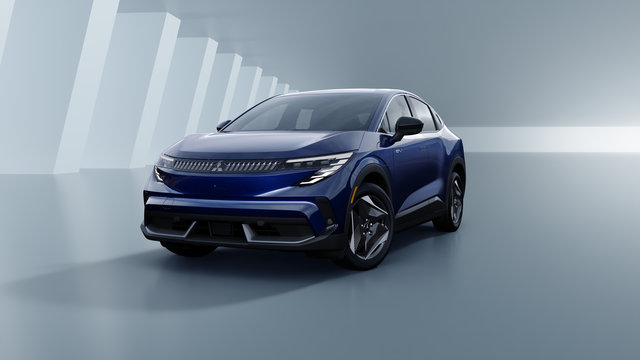
The 2027 Mitsubishi Eclipse Sportback is coming to British Columbia, and it marks a genuine shift for the brand....